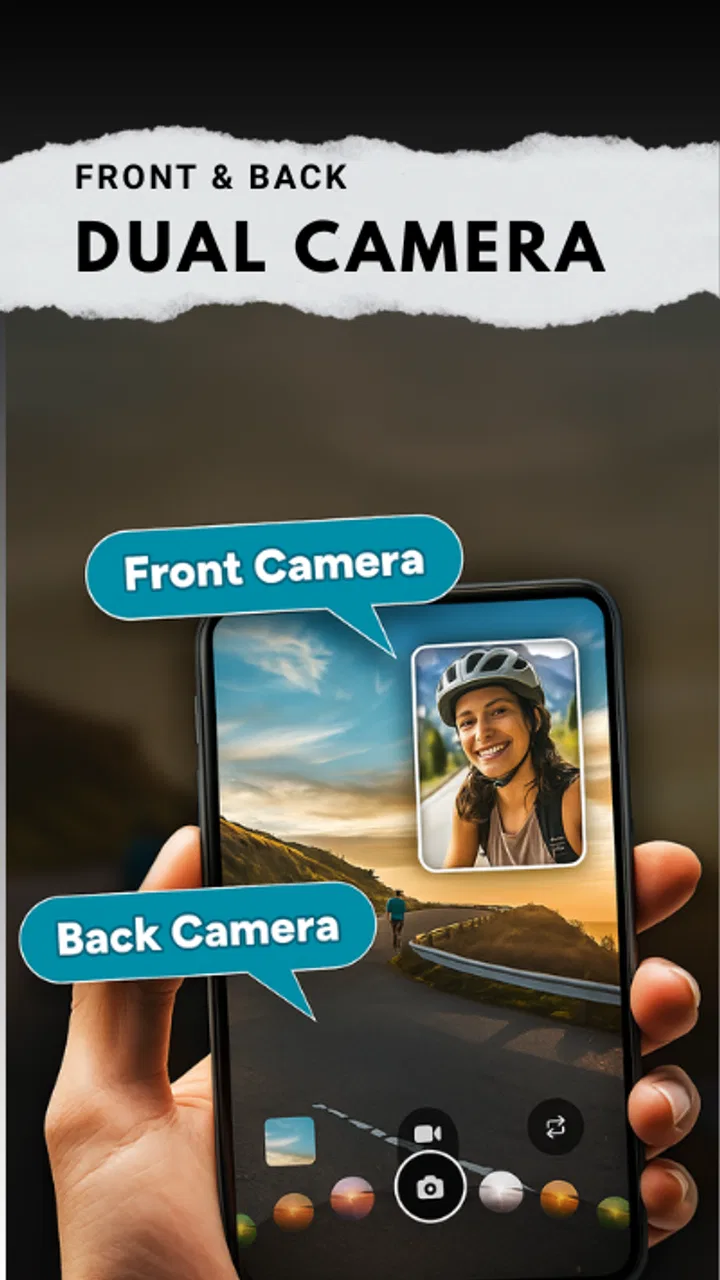
Dual Camera Front & Back
- 0.0
- Rating
- 10.00K
- Installs
- Free
- Price
 Analysis by App-foxy
I like the idea behind Dual Camera Front & Back because it focuses on a very specific moment: showing both what I am looking at and my own reaction at the same time. Instead of taking a normal selfie and then another picture of the scene, the app is built around a double-camera style that can make a quick memory, reaction, or short social post feel more complete. It sits in the Libraries & Demo area, but I found its practical appeal much closer to a lightweight camera experiment than to a traditional library tool.
That narrow purpose is both its charm and its limitation. If you want a simple way to combine the front and rear camera perspectives, this free app is worth trying. If you expect a full camera replacement, advanced editing suite, or a polished social network inside the app, you may feel restricted. My experience with it is best summed up this way: it can be useful when the two viewpoints matter more than perfect control, but it rewards patience during setup.
Where the first attempt can go wrong
The most common frustration with a dual-camera app is not necessarily the camera itself. It is the expectation that the first tap will immediately produce a finished image or video. With two camera views involved, the phone has to coordinate more than a standard selfie camera. A delay, an unexpected preview arrangement, or a result that does not look exactly like the live screen can make the app seem unreliable before you have learned its rhythm.
You May Also Like

 Blood Strike: 2.5 Anniversary
Blood Strike’s Loadouts Turn Every Drop Into a Tactical Gamble
A close look at Blood Strike’s custom loadouts: how fast access to signature weapons reshapes its battle royale rhythm, rewards preparation, and narrows the gap between fights.

 Pandora - Music & Podcasts
Pandora’s Music Is Easy to Start, but Harder to Recover
Pandora’s strength is its low-effort path from a seed to a station. Its weak spot is how much confidence it asks you to place in connection, setup, and quiet recovery.

 8 Ball Pool
 Is Built on Rivalries, Rematches, and Routine
A close look at the rivalries, rematches, shared routines, and unanswered safety questions that turn a quick pool match into a persistent mobile community.

 Samsung Music
’s Quiet Strength Is Playing What You Already Own
Its reach comes less from spectacle than from dependable access to a personal library. That simplicity is both the app’s strongest retention engine and its ceiling.

 AccuWeather: Weather Radar
AccuWeather Review: A Quick, Clear Forecast for Everyday Decisions
For everyday plans, the best forecast is the one you can understand quickly. AccuWeather makes rain timing, radar, and local conditions easy to act on, with a few trade-offs.

 Hill Climb Racing
Why Hill Climb Racing Still Turns Crashes Into One More Run
A tiny car, a bumpy hill and one more upgrade: Hill Climb Racing keeps resurfacing because its simple chaos makes every near-miss feel personal.
More From Our News Desk



I recommend starting with a quiet test rather than using it for an important moment. Hold the phone steadily, choose a well-lit location, and capture a short sample. That gives you a chance to understand how the front and rear views appear together, where your face sits in the composition, and whether the background is framed the way you want. This small test is especially useful when you plan to record a spontaneous reaction, because correcting the setup afterward may not recreate the original moment.
Another point that can catch people out is the difference between a live preview and the final result. A preview helps you position yourself, but it is not always the best guide to how the completed capture will feel. I pay attention to the edges of both views, not just the center. A face can look well placed while the rear camera is cutting off the object or scene that was supposed to be the main subject.
The best results come from treating the first capture as a composition check, not as the final shot. That sounds obvious, but it makes a noticeable difference with this type of app. I would rather spend a few seconds checking the framing than discover later that my expression is visible but the event, meal, pet, or landscape behind the phone is barely included.
Lighting can also create confusion. A bright background behind you may make the front-facing view look darker, while a strong light aimed at the rear scene can make your face seem less balanced. This is not a problem unique to this app, but the split perspective makes it more obvious. I get more usable results when both sides have reasonably even light and when I avoid standing directly in front of a window.
Movement is another practical issue. A normal single-camera photo can sometimes survive a quick change in position because the whole frame follows one viewpoint. A combined front-and-back capture has two visual stories, so sudden movement can make the result feel less coherent. For walking clips or quick reactions, I keep the phone at a comfortable distance and move slowly. That simple adjustment is more helpful than repeatedly retaking the same shot without changing the way I hold the device.
What I check before blaming the app
When the camera does not behave as expected, I first check the basics. The phone needs to meet the app’s minimum operating-system requirement, which is Android 8.0 or later. I also make sure the camera is not already being used by another application. Switching between a video call, a social app, and a camera tool can leave the next app waiting for access, so closing the previous camera session is a sensible first step.
I also look at the phone’s available storage before recording anything longer. A dual-view capture can be more demanding than a quick single image, and a nearly full device can create problems that look like app failures. I do not need a technical cleanup routine; removing a few large unused files and restarting the phone is often enough to make the next test more predictable.
The app is free, which makes experimenting easy, but free does not mean every phone will offer the same experience. Camera hardware, system software, and the way a manufacturer manages background processes can all affect how smoothly a camera app runs. I would not judge the concept from one failed attempt on a busy or older device without trying a clean restart and a simple test capture first.
One useful habit is to keep the first test short. A brief sample helps separate a setup issue from a sustained performance issue. If a short capture works but a longer one stops, the phone may be struggling with heat, storage, or background activity rather than with the basic idea of the app. I avoid charging the phone under a heavy load while testing, since warmth can make any camera experience less comfortable and less stable.
A calmer setup produces better two-sided shots
I begin by choosing the intended use before opening the camera. For a reaction to a view, I position myself so the rear camera has a clear subject. For a meal or object, I put the phone where my face remains visible without blocking the important detail. For a personal video message, I give the front view more attention and use the rear view as context rather than trying to make both sides equally busy.
That decision prevents one of the biggest composition mistakes: filling both frames with competing subjects. The strength of a front-and-back format is the relationship between the views. My face should explain the scene, or the scene should explain my face. When both sides are crowded, the result becomes difficult to read, especially on a small screen.
I also check the lens areas before starting. Fingerprints and smudges are easy to overlook when switching between the front and rear cameras, and they are much more visible when the result contains two perspectives. A quick wipe with a soft cloth is a more useful preparation step than changing settings repeatedly.
For a group moment, I place the phone where the rear camera sees the activity while the front view captures my reaction without forcing me to lean awkwardly into the frame. This is a good example of a workflow that is not obvious from the short store description: the app works best when the phone is treated as a small fixed viewpoint, not constantly held at arm’s length and moved around.
If the first result looks reversed or unfamiliar, I do not immediately assume it is defective. Front-facing previews often feel different from the way people expect a normal photograph to look. I compare the captured image with the live preview and decide which view is easier for me to understand. The important question is whether the final shot communicates the moment clearly, not whether it matches my mirror image.
Recovering when a capture fails
When a capture does not complete, I use a simple recovery order. I stop the attempt, leave the camera screen, and try again with a shorter sample. If that works, I change only one variable at a time: the phone position, the amount of movement, or the length of the recording. Changing everything at once makes it impossible to know what solved the problem.
If the app appears frozen, I close it fully and reopen it rather than tapping repeatedly. I then check whether another camera-dependent app is still active. A restart is reasonable if the phone has been used heavily, especially when several applications have been open. These steps are deliberately basic, but they are safer and more informative than installing unrelated cleaning tools or changing system settings without knowing what they affect.
A failed save deserves a different response from a failed preview. If the live camera appears correctly but the finished file is missing, I check the device’s storage and the usual media locations before repeating the capture. I also avoid taking many duplicate attempts immediately, because a storage problem can become worse while the phone continues creating temporary files or partial captures.
There is a useful trade-off here between spontaneity and reliability. The app’s appeal is strongest when it helps preserve an unplanned reaction, but the more important the moment, the more I favor a short test beforehand. For a casual clip with friends, I can accept some uncertainty. For a once-only event, I would use a familiar camera method as a backup rather than relying exclusively on an unfamiliar dual-view workflow.
When I am recording outdoors, I keep the phone firmly supported and avoid covering either lens while changing grip. A small shift can turn a carefully planned composition into a shot dominated by a finger, glare, or empty sky. This is a practical weakness of the format: because two views matter, a minor handling mistake affects more than one part of the result.
When the phone or situation is the real problem
Not every poor result points to the application. A dim room, a dirty lens, a nearly full device, or an unstable grip can produce an image that looks disappointing even when the camera process is functioning normally. I try the same scene with better light and a steady surface before deciding that the app is at fault.
Phone design matters too. Some devices handle simultaneous camera work more comfortably than others, and the available camera hardware can influence the balance between the front and rear views. Two phones running the same version may still feel different in speed, heat, or image quality. That is why I treat this app as a practical experiment rather than a guarantee of identical results on every Android phone.
Network conditions are not the first thing I investigate for a basic camera test. I focus on the camera session, storage, lighting, and system state before assuming that an internet connection is involved. This keeps troubleshooting focused and avoids making unnecessary changes to the phone.
It is also important to separate the app’s purpose from the behavior of other services. If I want to share a result through a social platform, that platform may resize, crop, compress, or display the file differently. A capture that looks fine in the phone’s media viewer can appear less balanced after another service processes it. I check the original result first, then judge the sharing step separately.
Privacy is part of the everyday decision as well. A combined front-and-back capture can reveal both my expression and the surrounding environment, including people or private details behind me. I make sure the rear view is appropriate before recording, especially in public places. The format encourages context, but context can also expose more than intended.
Who gets the most from this camera idea
I see the app working best for people who enjoy documenting reactions: travelers showing a landmark while appearing in the same capture, friends recording a response to a surprise, or someone preserving a quick view of a new place without choosing between a selfie and a standard photo. It can also suit casual creators who prefer an informal, in-the-moment look over a carefully edited production.
Parents and pet owners may find the concept useful when their own expression adds meaning to what the rear camera sees. A child’s performance, a pet’s unusual behavior, or a first look at a new room can be more memorable when the viewer sees both the subject and the person reacting. The app does not need elaborate editing to make that relationship understandable.
It is less suitable for people who need professional control over exposure, focus, audio, color, or layout. I would also skip it if my main goal is a polished portrait, a carefully framed landscape, or a long-form video project. A conventional camera app is usually the better choice when one viewpoint deserves all the attention or when I need predictable controls.
It may also frustrate users who want instant social publishing, extensive filters, or a built-in editing workflow. The appeal here is the dual perspective itself. If that feature is not central to what you want to create, adding another camera layer may simply make the process more complicated than taking a normal photo or video.
How it compares with familiar alternatives
A standard camera app is faster when I only need one view and gives me a cleaner composition by default. A selfie camera is better when my face is the story. A rear camera is better when image quality and the scene matter more than my reaction. Dual Camera earns its place only when both viewpoints carry useful information at the same time.
Compared with taking two separate pictures, the combined approach preserves the connection between the moment and my response. Two separate files can be more flexible, but they also require extra organizing and may not show exactly how I felt at the time. The trade-off is control: separate captures let me perfect each frame, while a simultaneous format is more immediate but less forgiving.
Compared with a social app that offers a similar two-camera concept, this app may appeal to someone who wants to begin with a focused camera tool rather than a larger social environment. On the other hand, a social platform may offer more familiar sharing and editing afterward. I would choose based on the workflow I want: capture first and decide what to do with the result later, or create directly inside a service built around publishing.
The app’s store summary describes a double-take style that combines a selfie and a photo at the same time, with a feel similar to a BeReal video. I think that comparison is useful as a description of the spirit, but I would not treat it as a promise that every part of those other services is included here. The practical value is the two-sided capture, not membership in a particular social format.
What the current release tells me about the audience
Boss Inc is the developer behind this app, which is listed as free and suitable for Everyone. Its current version is 7.0, and it was released on Aug 3, 2025. Those details make it easy to approach as a low-risk experiment: I can try the central camera idea without paying first, while still keeping realistic expectations about how a focused utility may differ from a mature all-purpose camera.
The app has passed 10K installs, while its displayed average rating is 0.0. I do not read those figures as a verdict on the concept itself. They mainly tell me that the public feedback picture is not something I would use as a substitute for testing the app on my own phone. For a camera tool, personal hardware and intended use matter so much that a short, controlled trial is more informative than a number alone.
The Everyone age rating makes the idea approachable for a broad audience, but responsible use still matters. I avoid recording other people without their awareness and check the background before sharing. A general age classification does not remove the need to think about consent, location, and private details in the frame.
My practical verdict after using the workflow
I recommend Dual Camera Front & Back to anyone who specifically wants a front-and-rear perspective in one spontaneous capture. Its strongest quality is not a long list of tools; it is the way the format connects my reaction with the scene in front of me. When the lighting, grip, and composition are prepared, the result can feel more personal than a normal selfie or a separate landscape shot.
I would install it with a clear plan: test a short capture, check both edges of the composition, keep the phone steady, and confirm that the original result is saved before attempting an important moment. If something fails, I would restart with one change at a time and check storage, camera access, and system load before blaming the software.
My final judgment is favorable but specific. This is not the camera I would use for every photo, and it is not a replacement for a full-featured video editor or a polished social platform. It is a focused free app for moments where seeing me and seeing what I see are equally important. If that describes the way you want to capture memories, the experiment is worthwhile. If it does not, a regular camera will probably be simpler, quicker, and more flexible.
FAQs for Dual Camera Front & Back
01How does Dual Camera Front & Back work?
Dual Camera Front & Back allows users to capture photos or videos using both front and back cameras simultaneously. This feature enhances storytelling by providing a dual perspective, perfect for vlogs, events, or travel memories. The app seamlessly stitches the footage, offering an immersive viewing experience.
02What are the key features of Dual Camera Front & Back?
The app offers features such as simultaneous recording from both cameras, easy switching between camera views, various layout options, and intuitive editing tools. Users can also apply filters and effects to enhance their media. Its user-friendly interface makes it accessible for both novice and experienced photographers.
03Is Dual Camera Front & Back compatible with all smartphones?
While the app is designed to work with most modern smartphones, compatibility may vary based on device specifications and operating system versions. It is recommended to check the app's requirements and user reviews specific to your device model on the app store before downloading.
04Does Dual Camera Front & Back affect battery life significantly?
Using both cameras simultaneously can increase battery consumption. The app is optimized for efficiency, but users should be aware that extended use may drain the battery faster than usual. It is advisable to monitor battery levels and have a charger handy during prolonged use.
05Are there any privacy concerns with using Dual Camera Front & Back?
Dual Camera Front & Back requires camera access to function, but it respects user privacy and does not collect or share personal data without consent. Users should review the app's privacy policy and permissions before installation to ensure they are comfortable with the data usage policies.
Pros
- Seamless switching between front and back cameras.
- User-friendly interface with intuitive controls.
- High-quality image and video output.
- Includes filters and editing tools for creativity.
- Lightweight app with minimal battery usage.
Cons
- Limited compatibility with older devices.
- Occasional lag when switching cameras.
- No manual focus adjustment available.
- Limited resolution options for video recording.
- Ads may interrupt user experience.

Dual Camera Front & Back
Gallery